



How to Use the INEC CVR Portal: Step-by-Step Registration Guide
Learn how to pre-register, transfer your polling unit, or replace a lost PVC using Nigeria's INEC Continuous Voter Registration (CVR) portal.


Participating in elections is one of the most powerful ways to shape the future, but historically, the process of getting registered to vote has often meant long queues, exhausting paperwork, and hours spent under the sun.
To bridge this gap, Nigeria's Independent National Electoral Commission (INEC) introduced the Continuous Voter Registration (CVR) Portal. If you visit the launch page at cvr.inecnigeria.org/Home/start
Here is an in-depth breakdown of what this portal is, how it works, and how to navigate it seamlessly to make your voice count.
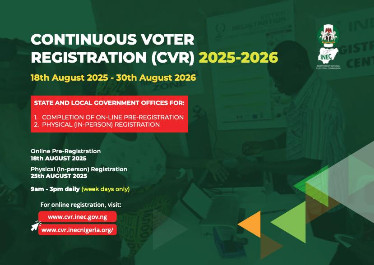
What is the CVR Portal Start Page?
At its core, this portal serves as a hybrid system designed to expedite voter registration. While you cannot complete the entire process online—because secure biometric data like fingerprints and facial scans require physical capture—the portal allows you to handle all the heavy lifting (paperwork, document uploads, and scheduling) from your phone or computer.
When you land on the page, the user interface focuses on two simple actions: logging in or creating a new portal account.
Key Features Available on the Portal
Once inside, the portal expands into a full suite of voter management tools, allowing you to:
- Start a New Registration: Fill out your data ahead of time.
- Review Voter Status: Double-check if your existing registration is valid and properly captured in the national database.
- Track PVC Pickup: Check the readiness and location of your Permanent Voter’s Card (PVC).
- Locate Registration Centres: Find the closest official INEC physical office or temporary capture point.
- Request Transfers or Corrections: If you have relocated or noticed a typo in your name or date of birth, you can apply for corrections online.
Step-by-Step: How to Register Using the Portal
To ensure your data passes validation without a hitch, INEC requires a specific sequence of actions. Skipping a step or ignoring the physical biometric requirement means your application will remain incomplete and won't make it to the final voter register.
- Create Your Portal Account
Takes less than 3 minutes
Go to the start page and sign up. You can speed this up by using the Sign in with Google button, or create a traditional account by providing your full name, mobile number, email address, and a secure password. - Fill Out the Pre-Registration Form
Have your identity details ready
Log in and select 'New Registration'. Fill out your personal details accurately, including your state, local government area (LGA), and preferred polling unit. You will also need to upload a digital copy of a valid ID (like a National Identity Number (NIN) slip, driver's license, or international passport). - Schedule a Biometric Appointment
Choose a convenient date and location
Once your form is submitted, the portal generates a temporary reference number. Use the built-in calendar to select a date, time, and specific INEC registration centre near you to complete your biometrics. - Visit the Centre for Biometric Capture
The final, crucial step
Print out your online application slip and head to your designated centre on your appointment date. An INEC official will scan your slip, capture your fingerprints and facial photo, and hand you a temporary voter's slip.
Why This Digital Shift Matters
The brilliance of this setup is that it dramatically drops the wait times at physical validation centres. Instead of filling out clipboards by hand while waiting in line, the INEC official simply scans your pre-registration QR code or inputs your reference number, pulls up your profile instantly, captures your biometrics, and sends you on your way.
A Quick Note on Deadlines: INEC opens and pauses portal access in cycles based on upcoming election timelines to give them room to clean up data, eliminate duplicate registrations via their automated system, and print physical cards. Always keep an eye on the "Important Notice" section at the top of the homepage for current operational windows.
Navigating the portal is a straightforward process that puts the power of registration right back into your hands. If you are eligible and haven't registered yet, or if you simply need to transfer your polling unit closer to your current home, setting up an account on this page is your perfect starting square.
What's Your Reaction?
 Like
0
Like
0
 Dislike
0
Dislike
0
 Love
0
Love
0
 Funny
0
Funny
0
 Wow
0
Wow
0
 Sad
0
Sad
0
 Angry
0
Angry
0


Comments (0)